FAQs
ON LEDGER & BADGES
Learn how your files are secured and verified on the ledger.
What data is being stored on the ledger?
- Digital hash: a unique fingerprint of your file
- Filename: the original file name
- Date stamp: exact time the file was recorded
What can we use it for?
- Timestamping your files to freeze them at submission.
- Detecting tampering if any changes occur after submission.
- Examples: Conflicting contracts, intellectual property, original photos.
What is a Verified Badge?
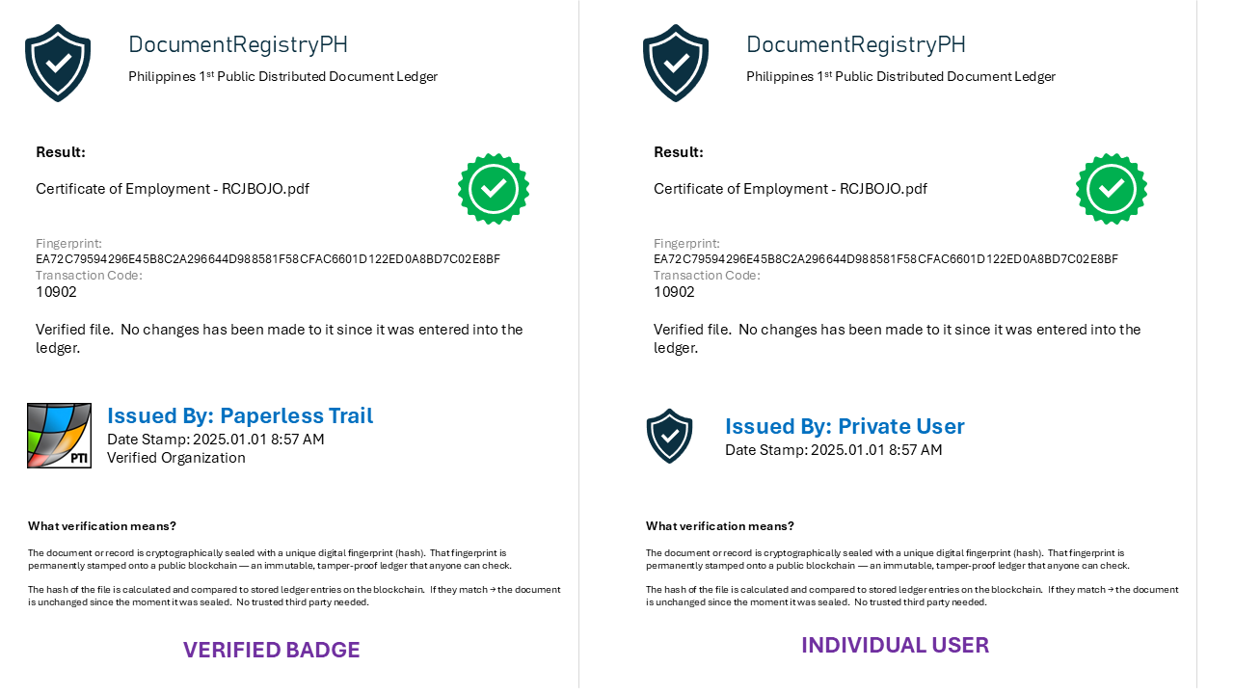
A badge displayed during record verification. Labelled as “Issued by”, it indicates the record has been verified and matches the original submission.
Examples of usage
- First version of a contract stamped and verifiable, any changes get a new date stamp.
- Original photos locked in the ledger to prove time of creation vs copied versions.
Where is the DocumentRegistryPH ledger hosted?
Hosted in the Microsoft Azure Confidential Ledger.
Learn more about Azure Confidential Ledger
How do we sign-up for a badge?
Sign up here to request a Verified Badge.
How do we register files when we have a badge?
- A software client will be issued to your organization.
- The DocumentRegistryPH client will be locked to one publishing machine. No other workstation in your network can submit files.
- If the machine crashes or workload needs to be moved, re-apply for a license key.
- This protects the integrity of your issued documents.
Are there any risks in using the platform?
The risks are low. The platform does not store your files, only their digital fingerprints (hashes).
Files are never transmitted to the servers. Digital fingerprints are calculated locally in the browser and only the hash is sent to the ledger.
For Verified Badges, the primary risk is unauthorized personnel registering fraudulent records. This is mitigated by locking registration to a specific nominated workstation. License files are encrypted and cannot be moved to other machines. Organizations should ensure that only authorized personnel are allowed to publish records.